



Build custom, structured Excel reports from monday.com board data and send them automatically to the right people on schedule.





Spreadsheet Gorilla
Export Excel reports from
monday.com on a schedule
Turn monday.com boards into reusable Excel report templates and automatically
deliver the finished spreadsheets to clients, management or finance.
-

-

-

-

-

-

- 1,102 Installs

Spreadsheet Gorilla helps teams transform monday.com
boards into structured spreadsheet configurations
for automated Excel reporting on schedule.
Simon Kusterer
Gorilla Apps

Why export monday.com to Excel?
Many teams rely on Excel spreadsheets for reporting, financial analysis, and sharing structured data outside monday.com. While monday.com provides a export feature, it often lacks the flexibility needed for real reporting workflows. Spreadsheet Gorilla solves this by allowing you to define spreadsheet templates that transform monday.com board data into structured spreadsheets.
Once set up, the same spreadsheet template configuration can export consistent Excel reports whenever needed.
How do teams use Spreadsheet Gorilla?
Spreadsheets remain essential for reporting and data analysis across many organizations. Teams leverage the app on monday.com to:
- Create structured Excel reports from monday.com boards
- Combine multiple boards into a single spreadsheet
- Calculate metrics across boards using formulas
- Automate recurring reporting workflows
- Share Excel exports with stakeholders
Ask AI if Spreadsheet Gorilla for
monday.com fits your business
Get an independent explanation of how Spreadsheet Gorilla
could fit your reporting and spreadsheet workflow.
How it works
How Spreadsheet Gorilla
for monday.com works
Spreadsheet Gorilla for monday.com is built around reusable spreadsheet templates. Each
template defines how monday.com board data should be processed before exporting.
Once created, spreadsheet templates can generate consistent reports anytime.
Create a template
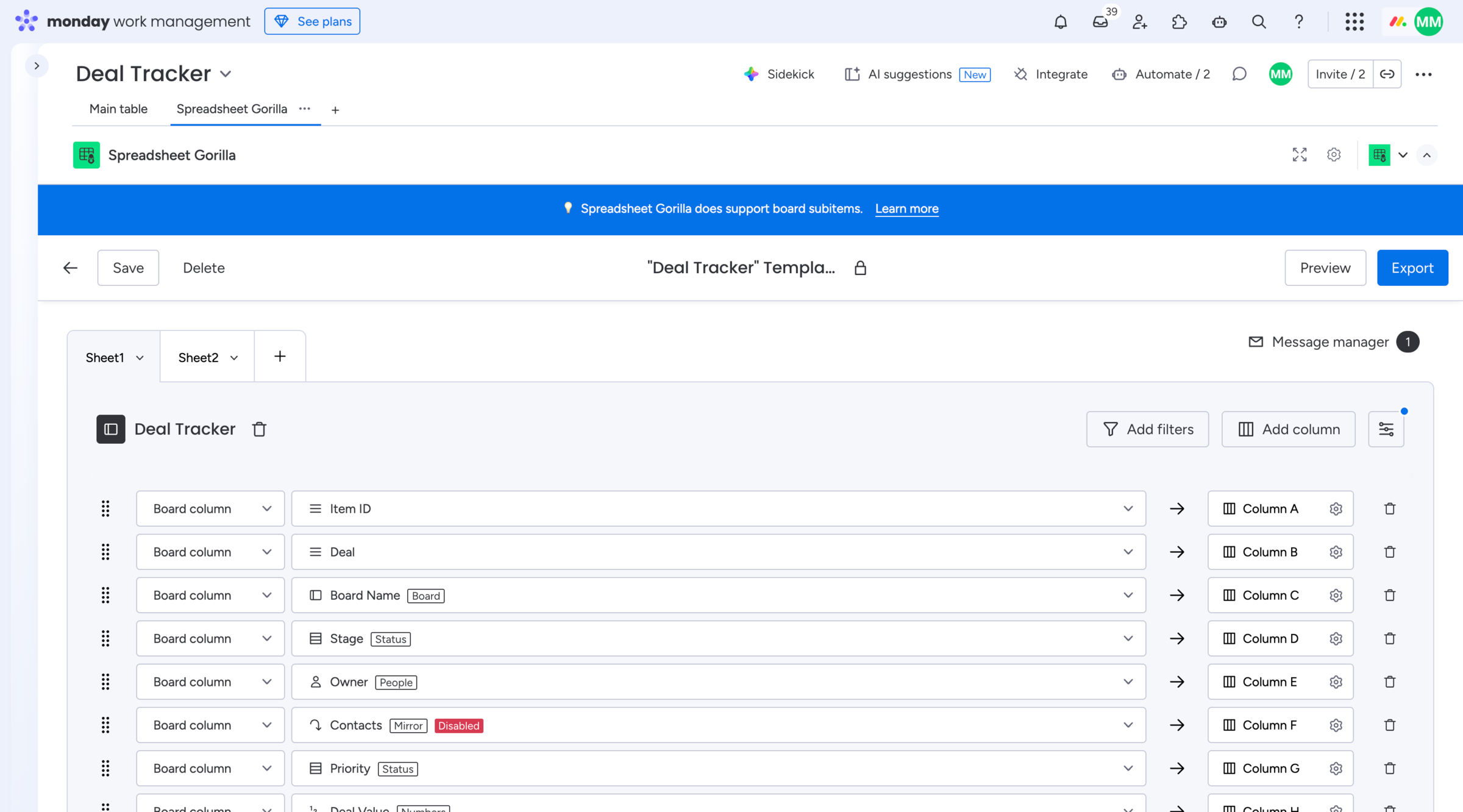
Connect the boards and select the columns you want to include in your spreadsheet template.
Configure the template
Structure your spreadsheet using worksheets, board filters, column mapping, and formulas.
Export to Excel
Export your spreadsheet manually as XLS and CSV, or email it with monday.com automations.
How to use
Explore how to export your monday.com boards to Excel
Learn how templates, worksheets, board filters, and formulas work together to create spreadsheet exports. Explore the documentation to see how templates are built and how exports are generated.

Testimonials
Teams using Spreadsheet Gorilla in real workflows
Spreadsheet Gorilla for monday.com helps teams export, transform, and automate monday.com board data in spreadsheets. Here is what users say about using the app in real workflows.
We use Spreadsheet Gorilla to export project status reports from monday.com and share them with our management.
Operations team
Great concept that helps us get exactly the reports we need.
The app lets us run formulas that aren’t available in monday.com and update our board items.
Spreadsheet Gorilla makes it easy for us to share consistent Excel reports every week.
Project management
Features
Spreadsheet features
built for monday.com
Spreadsheet Gorilla runs directly inside your workspace and integrates
seamlessly with your boards to keep all Excel exports synchronized.
Create reusable templates along with worksheets that define how monday.com boards should be structured and exported.
Embed monday.com formula columns into your exported Excel spreadsheets. Support is currently considered experimental.
Export spreadsheets manually or trigger exports to Excel automatically using monday.com automations.
Use custom formulas to calculate and embed values into spreadsheets or to update metrics in board items.
Filter board items before exporting so spreadsheets only contain the exact monday.com data required for reporting.
Built for monday.com
Spreadsheet Gorilla runs directly in your workspace and works with your existing boards, subitems and workflows.
Works with your monday.com products
Spreadsheet Gorilla works with any monday.com product, allowing teams to export and share
CRM pipelines, project updates, or development workflows with internal or external users.
 |
monday work management For projects and tasks |
 |
monday CRM For customer-facing teams |
 |
monday dev For product and dev teams |
 |
monday service For IT and support |
Blog
Guides and tutorials for exporting
monday.com boards to Excel
Explore tutorials, solutions and technical guides for
exporting Excel spreadsheets with monday.com.
How do I export and email Excel spreadsheets on monday.com?

Are you looking for a way to send emails with attached Excel spreadsheets through monday.com automations? In this guide, we'll explore how to recurrently email Excel reports based on monday.com boards.
How to create a weekly project status report from monday.com in Excel

Learn what a weekly project status report should include and how to turn monday.com data into a structured Excel workbook for recurring stakeholder reporting.
How do I make use of Spreadsheet Gorilla for monday.com?

Spreadsheet Gorilla is a powerful tool for everything spreadsheets on monday.com and beyond. In this guide we will explore all the apps' features like exporting to Excel, and how you can utilize them.
-
Spreadsheet Gorilla allows you to create spreadsheet templates that can generate Excel exports manually or through monday.com automations.
-
Can multiple boards be combined into one spreadsheet?
Yes. Spreadsheet templates can include multiple boards and organize them across worksheets.
-
Can formulas be used in spreadsheet templates?
Yes. Spreadsheet Gorilla supports Excel-like formulas that calculate metrics across board data. Formula column support is present as well, but currently considered experimental.
-
Can board items be filtered before exporting?
Yes. Each board included in a template can be filtered before generating the spreadsheet export.
-
What formats can spreadsheets be exported to?
Spreadsheet Gorilla supports exporting spreadsheets as Excel, CSV, and HTML files.
Pricing
Save 20% annually or stay
flexible month to month
One plan includes all Spreadsheet Gorilla features for your entire monday.com account. Try it free for 14 days and receive a full refund if you cancel within 30 days. Payments and invoicing are securely processed directly between your organization and the monday.com marketplace team.
Small from
$40 / MONTH
Annual billing
Export and email up to 100 Excel files per month automatically. Monthly billing is priced at $50 per month.
Medium from
$80 / MONTH
Annual billing
Export and email up to 250 Excel files per month automatically. Monthly billing is priced at $100 per month.
Large from
$120 / MONTH
Annual billing
Export and email up to 500 Excel files per month automatically. Monthly billing is priced at $150 per month.
Get started
Get started with Spreadsheet
Gorilla for monday.com
Test the app with your workflows and request a free extension on demand before subscribing.
Subscribe risk-free and cancel within 30 days of purchase to receive a full refund automatically.
Cancel your subscription anytime before the next billing cycle with no long-term commitments.
Try for free
Start exporting monday.com boards to Excel today
Create reusable spreadsheet templates and generate structured Excel spreadsheet reports directly from your monday.com boards. Get started for free today with your free 14-day trial.