
Build custom, structured Excel reports from monday.com board data and send them automatically to the right people on schedule.


The 6 best ways to build a client portal with monday.com
Compare six ways to build a client portal with monday.com and see how each approach handles client access, data separation, setup and ongoing maintenance.

Table of contents
Use the navigation below to quickly jump to your desired section and learn more about each topic.
There is more than one way to build a client portal around monday.com. You can use monday’s own Customer Portal, add a purpose built Marketplace app, create an application with AI, connect monday.com to an external portal platform, or build the client facing application yourself. The result can look similar to the client. Behind the scenes, however, they differ in how clients sign in, how access to their data is controlled and how much you need to build yourself. They also differ in how quickly you can get started, how much flexibility you have, what you need to maintain over time and how the costs scale.
This guide compares six different approaches and uses one current solution to represent each of them. They are not ranked from best to worst. The best approach depends on how your monday.com workflow is structured and how much of the client experience you want to configure or build yourself.
Do you actually need a client portal?
Before building a separate portal, consider whether your clients actually need one. If external users are comfortable working directly inside monday.com, guest access may already be enough. You can invite guests to Shareable Boards and let them collaborate with your team inside the monday.com interface.
A separate client portal becomes more relevant when clients should have their own external experience, sign in independently from your monday.com users, and only access the information intended for them. If your main requirement is simply to share boards with people outside your organization, our guide to sharing monday.com boards with external users and guests covers the available options in more detail.
Overview
The six approaches at a glance
The six approaches in this guide cover a spectrum from using a ready made portal to building the complete application yourself.
| Approach | Best suited to | |
|---|---|---|
 | Native service portal | Ticket and request based client relationships |
 | Purpose built portal | Existing monday.com workflows need a dedicated client facing layer |
 | AI built monday app | Custom applications created around monday.com data with AI |
 | External portal platform | Broader no code portals using monday.com as a data source |
 | Custom no code app | Custom applications with more control over interface and logic |
 | Custom API application | Highly bespoke applications where you want full control |
The further you move down the list, the more freedom you generally gain to define your own application. At the same time, more of the login, access rules and application behavior becomes your responsibility.
Example workflow
A simple example to compare the six approaches
To make the differences easier to understand, we will use the same simple monday.com board throughout this guide.

The requirement is straightforward:
- When Client A signs in, they should see
Item 1,Item 2andItem 3. - When Client B signs in, they should see
Item 4andItem 5. - Neither client should be able to access the other client’s items.
Every approach in this guide therefore needs to answer the same two questions:
- How does the system know whether Client A or Client B has signed in?
- How does it determine which monday.com items that client is allowed to see?
These two questions reveal the main differences between the six approaches.
Beyond access
What else matters in a client portal?
Our simple example focuses on the first requirement every client portal needs to solve: showing the right information to the right client. In a real portal, the decision usually also depends on what clients should be able to do once they are signed in.
Some teams only need clients to view information, while others need file uploads, comments, approvals, editing or several pages of content. Branding and custom domains may matter too. You may also need to consider whether monday.com is your only data source, how many clients will use the portal, how much setup and ongoing maintenance you want to own, and whether costs are fixed or scale with seats, users, AI credits or application usage.
We keep the Client A and Client B example deliberately simple because that makes the underlying access question comparable across all six approaches.
Native portal
1. Use monday’s native service portal
A first option is to use the Customer Portal included with monday service.

How this approach works
monday service provides an external Customer Portal where requesters can submit requests, access resources and track their tickets. Portal visitors do not need to be monday.com account users.
The client specific relationship is based on the requester behind each ticket. monday service matches the requester email stored on the Tickets board with the email address used to sign in to the Customer Portal. Tickets submitted by that requester, or shared with them as a participant, then appear in My Tickets.
| Initial setup effort | ●○○○○ |
| Ongoing maintenance | ●○○○○ |
| Cost model | Seat based monday service subscription |
Most of the portal, authentication and requester access model is already provided. The main consideration is whether your workflow naturally fits monday service, rather than how much application logic you need to build yourself. Customer Portal user allowances also depend on the monday service plan.
How it handles our example
Our example works naturally if Item 1 through Item 5 are tickets. Item 1, Item 2 and Item 3 can be tickets associated with Client A’s requester email. Item 4 and Item 5 can belong to Client B. When Client A signs in, My Tickets shows the tickets associated with Client A. Client B sees the tickets associated with Client B.
The Status column also maps naturally to this model because the Customer Portal displays ticket status and can let requesters close or reopen tickets. The important distinction is that access is based on the relationship between a requester and their tickets.
When this approach fits
This approach works particularly well when the items clients need to access are service requests, support cases, incidents or similar tickets. If your client relationship already follows that pattern, monday service already handles the external portal, who the requester is and which tickets they can see.
If Item 1 through Item 5 instead represent projects, campaigns, properties, orders or other general business records, the model becomes less direct because the Customer Portal is built around tickets rather than arbitrary items from any operational board. For a deeper look at monday’s native portal capabilities, see our guide on whether monday.com has a client portal.
Setup and maintenance
The portal itself is largely configured rather than built. The main requirement is that your workflow follows the monday service ticket model and that requester information is captured correctly. The Tickets board needs to use the core Email column so monday service can match a ticket to the corresponding portal login.
Key takeaway
monday service Customer Portal is a strong first party option when the records clients need to access are naturally tickets or service requests. If you want to expose general client related items from existing monday.com workflows, another architecture may fit those records more directly.
Purpose built portal
2. Add a purpose built client portal to monday.com
Another approach is to keep monday.com as the operational workspace and add a dedicated client facing layer on top of it. Client Portal Builder for monday.com represents this model.

How this approach works
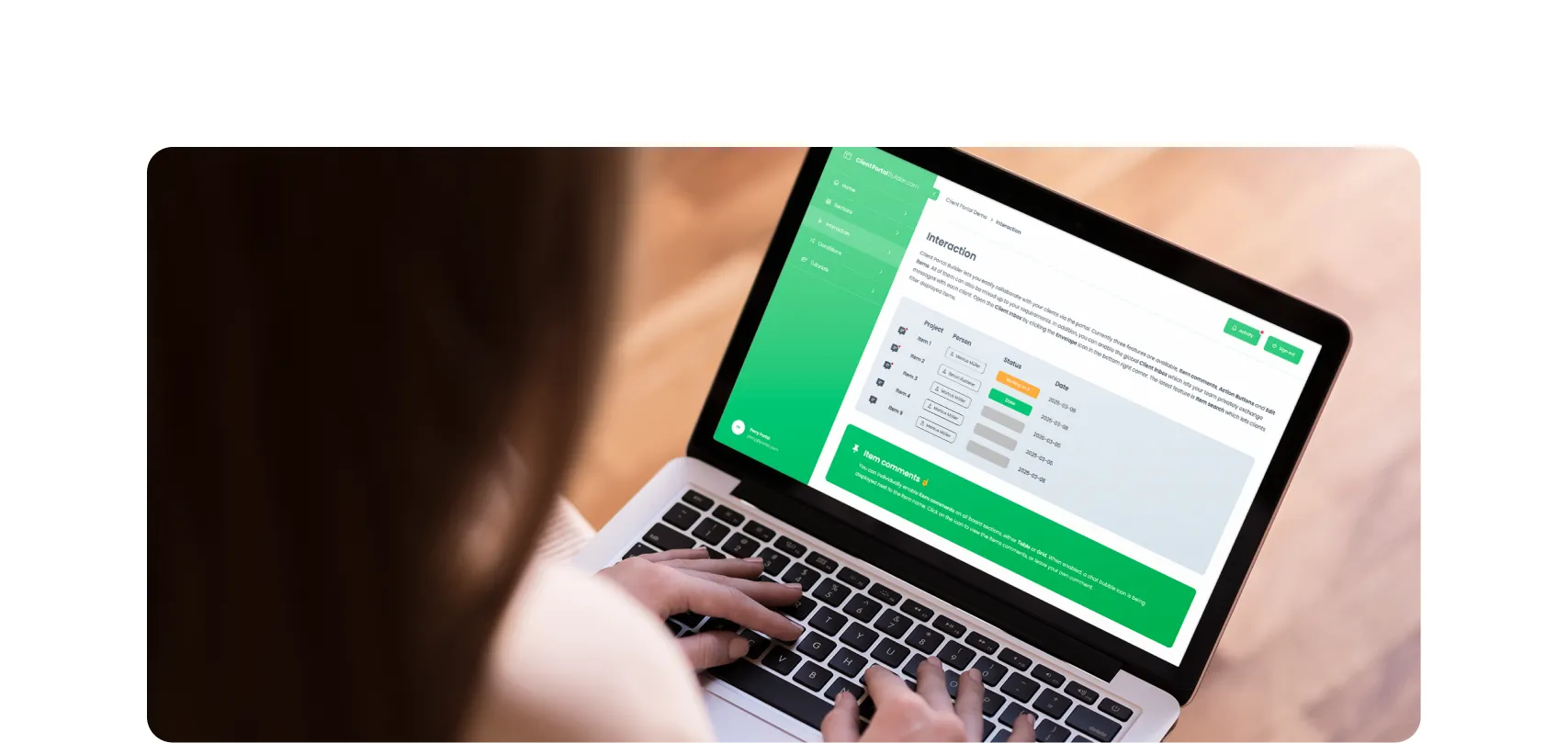
Instead of building an external application and defining its access rules yourself, Client Portal Builder for monday.com provides a ready made way to manage clients and their portal access inside monday.com.
A Clients Board identifies the clients using the portal. Each client can receive one or more login methods, which are managed independently from native monday.com user accounts and do not consume monday.com seats. Board sources then determine how monday.com boards and items relate to those clients and which information each client is allowed to access.
| Initial setup effort | ●●○○○ |
| Ongoing maintenance | ●○○○○ |
| Cost model | Fixed account wide subscription |
Client logins, the connection between clients and monday.com data, and the portal structure are already part of the product. You mainly configure how your existing monday.com data should be exposed rather than building and maintaining a separate application.
How it handles our example
For our example, Client A and Client B would each be represented by an item on the Clients Board. The board containing Item 1 through Item 5 can remain as it is. A Connect Boards column links each item to the related client. Client Portal Builder has a board source specifically for this structure: one board contains items for multiple clients, and each client sees only the items linked to them.
- When Client A signs in, the portal therefore displays
Item 1,Item 2andItem 3. - When Client B signs in, it displays
Item 4andItem 5.
The underlying items stay on the existing monday.com board. The portal controls which of those items are exposed to each client.
When this approach fits
This model is useful when monday.com already contains the operational data clients should see. Your internal team continues working in monday.com, while clients receive a separate experience around selected parts of that data. The portal can later extend beyond the simple example with additional pages, board tables, grids, files, comments, editing, automations and other client interactions.
The core client and data relationship, however, is already part of the product. This approach becomes less suitable when the requirement is really to create a completely bespoke software application with arbitrary application logic or several unrelated backend systems.
Setup and maintenance
The main difference is that you configure the portal instead of building the client login and access rules yourself. For our example, you create the Clients Board, connect the shared board through a board source and link each item to the appropriate client. The relationship remains visible inside monday.com and can evolve with the workflow.
Key takeaway
A purpose built monday.com portal is a natural fit when the data already lives in monday.com and the main requirement is to expose the right records to the right external clients. With Client Portal Builder, client logins, monday.com relationships and what each client can see are things you configure rather than application logic you need to create yourself.
AI built app
3. Build a custom monday application with AI
A newer approach is to use AI to create a custom application directly around your monday.com data. monday vibe represents this model.

How this approach works
With monday vibe, you describe the experience you want and generate an application connected to monday.com boards. Vibe apps can read and write connected board data. Public Vibe apps can also be published to the open web, where anyone with the link can access them without a monday.com account or login. This means Vibe is no longer limited to internal applications.
| Initial setup effort | ●●●○○ |
| Ongoing maintenance | ●●●○○ |
| Cost model | Vibe package plus usage based AI credits |
AI reduces the amount of application building you need to do manually, but you are still creating and maintaining a custom application. Publishing requires a paid Vibe app package, while building is usage based: every prompt consumes AI credits, with current guidance ranging from about 10 to 20 credits for Gemini Flash, 30 to 50 for Claude Sonnet and up to 500 for complex Claude Opus requests. Published apps can also consume credits when they run AI functionality.
How it handles our example
Building an interface that displays Item 1 through Item 5 is not the difficult part. Vibe can work with connected monday.com board data and an application can contain logic that filters which records are displayed. The challenge is identifying who is using the public app. monday currently (September 2026) states that public Vibe apps have no connected users and therefore no per user permission layer. Anyone with the link can interact with the app according to the logic built into it.
That means a public Vibe app does not automatically know: This visitor is Client A.
Because the public app does not know who the visitor is, it cannot automatically show Client A one set of records and Client B another. Retrieving and filtering the items is possible. What is currently missing is a built in client login that lets the app apply the right filter securely for each visitor.
When this approach fits
Vibe is interesting when you want a custom experience around monday.com data and want to create or iterate on that application through AI. This can include public tools, custom dashboards and focused applications for customers, partners or other external audiences.
It is less naturally suited to a conventional client portal when every external visitor needs an individual login and each signed in client should automatically see only their own records. monday is developing Vibe quickly, so this distinction is worth checking again when evaluating the product for a future implementation.
Setup and maintenance
Compared with a ready made portal, Vibe gives you more control over what the application does. That also means the application itself needs to contain more of the logic. You describe and iterate on the interface and behavior through Vibe, connect the necessary boards and maintain the generated application as the underlying requirements evolve.
There are also broader AI development routes around monday.com, including its APIs and MCP capabilities, but those are better understood as development tools rather than ready made client portal solutions.
Key takeaway
monday vibe can now create external applications connected directly to monday.com. For our Client A and Client B scenario, the current limitation is not displaying monday.com data. It is that public apps do not currently provide the built in client login and per user access rules expected from a conventional client portal.
Portal platform
4. Put a no code portal platform in front of monday.com
Another approach is to build the portal in a separate no code platform and use monday.com as a connected data source. Softr is a strong example of this approach.

How this approach works
Softr provides its own users, pages, blocks, user groups and data permissions. monday.com can be connected as a native data source. Softr can display monday.com boards in dynamic blocks, work with Connected Boards and subitems, and edit many monday.com fields. Its workflows can also create, retrieve, update and delete monday.com records.
With this setup, monday.com remains the operational data source while Softr provides the external application experience.
| Initial setup effort | ●●●○○ |
| Ongoing maintenance | ●●●○○ |
| Cost model | Subscription with client and team user allowances |
Softr already provides users, permissions, pages and record restrictions, so you do not need to create those concepts from scratch. The monday.com data source is available on Professional and higher plans. You do, however, maintain a separate application and its relationship to monday.com. Costs can also increase as the number of external client users grows.
How it handles our example
Client A and Client B become users of the Softr application. The monday.com board still contains Item 1 through Item 5. Softr then needs a rule that connects the logged in user with the records that person is allowed to access.
Global Data Restrictions are designed for this kind of use case. Softr can restrict records according to information about the logged in user and explicitly describes client portals as a common use case for those restrictions.
- Client A signs in and receives records that match the restriction configured for Client A.
- Client B signs in through the same application but receives a different set of records.
When this approach fits
This approach makes sense when you want more than a monday specific client portal. For example, your application might display operational data from monday.com while also connecting to another database, a CRM or a different backend system. Softr supports multiple data sources inside the same application, with individual blocks connected to different sources. The advantage is broader application flexibility.
The tradeoff is that you now have a separate application with its own users, access rules and configuration alongside monday.com. For a deeper comparison with a purpose built monday.com portal, see our Client Portal Builder vs Softr guide.
Setup and maintenance
For our simple example, you need to connect monday.com, configure the external users and create the restriction that maps each user to their permitted monday.com records. You then build the pages and blocks that display those records.
This is still a no code configuration process, but you are configuring a general application platform rather than a product built specifically around monday.com client portals.
Key takeaway
Softr is well suited when monday.com is a data source behind a broader external application. It can solve the same Client A and Client B visibility problem, but the client login and rules that determine which records they can see are configured in Softr rather than being built specifically around monday.com portals.
Custom web app
5. Build a custom no code web application connected to monday.com
If you need more control over the actual application, you can use a no code application builder and connect it to monday.com. WeWeb represents this approach.
How this approach works
WeWeb added its native monday.com integration recently (September 2026). The integration is explicitly positioned for building client portals and internal tools around existing monday.com boards. WeWeb states that these applications can read from and write back to monday.com. Instead of selecting a predefined portal structure, you design the client facing application and decide how its authentication, interface and logic should work.
| Initial setup effort | ●●●●○ |
| Ongoing maintenance | ●●●●○ |
| Cost model | Builder subscription plus hosting and backend usage |
WeWeb gives you considerably more control, but authentication, client relationships and access logic become part of the application you design. End users are not priced per seat, but hosting, backend usage and other application infrastructure can introduce additional costs depending on how the solution is built.
How it handles our example
The monday.com connection gives the application access to Item 1 through Item 5. But the connection alone does not define what a client is or which items belong to that client. You therefore need to design the application so it can answer the same two questions:
- Who is Client A?
- Which monday.com records should Client A receive?
The external user model, the relationship between the authenticated user and the client value, and the filtering or access logic are parts of the application you create. Client A can ultimately receive Item 1, Item 2 and Item 3, while Client B receives Item 4 and Item 5, but you define how that separation works.
When this approach fits
This route becomes interesting when the external experience needs to behave more like a custom web application than a standard client portal. You may want a highly custom interface, unusual user journeys, additional backend services or application logic that does not fit naturally into the structure of a dedicated portal platform.
The benefit is control. The consequence is that more design decisions move from the product to the person building the application.
Setup and maintenance
You need to connect monday.com and create the application around it. That includes the client facing UI and, depending on how you build it, the client login and rules that determine which data each client can access.
Because the native monday.com integration is very new, any implementation that relies on specific monday.com column types or more advanced interactions should be validated against the current integration before committing to the setup.
Key takeaway
WeWeb is a good example of the point where a monday.com client portal becomes a custom application project. You gain more freedom over the experience, but you also need to define how clients sign in, how they relate to monday.com data and what each client can access.
Custom API app
6. Build the client application yourself around the monday API
At the far end of the spectrum, you can create your own application and use the monday API to connect it to the operational data. Bubble is one platform that can support this model.
How this approach works
Bubble provides the tools to build a custom web application with its own users, data model, interface and application logic. monday.com can then be connected through its API or through third party integrations.
The monday API supports reading board and item data and updating column values, including Status values such as the ones in our example. At this point, monday.com is one system used by an application whose overall setup you control.
| Initial setup effort | ●●●●● |
| Ongoing maintenance | ●●●●● |
| Cost model | Subscription plus workload usage |
Bubble gives you the most freedom, but also leaves you responsible for the whole application, including client logins, access rules and the monday.com API integration. Its running costs depend partly on workload usage, so both implementation effort and infrastructure consumption need to be considered.
How it handles our example
Nothing about Client A and Client B is predefined. You decide how that signed in user maps to the Client column or another relationship in monday.com. You decide which API requests retrieve Item 1 through Item 3 for Client A and Item 4 through Item 5 for Client B. And you decide where those access rules are enforced.
Bubble has its own privacy model for data stored in Bubble, but integrations with external APIs still need to be designed securely. Bubble specifically warns that API Connector configurations can expose data if authentication and access controls are not implemented correctly.
When this approach fits
This approach makes sense when the portal is becoming a bespoke software application. Perhaps you have unusual account structures, complex business logic, multiple backend systems or requirements that would be difficult to express within a ready made portal or no code portal platform.
The main advantage is that you can define almost everything. The downside is that almost everything becomes your responsibility as well.
Setup and maintenance
You need to build and maintain the client login, access rules, monday.com integration, interface and application behavior. Changes to the underlying workflow may also require changes to queries, mappings or application logic. That level of ownership can be justified for a genuinely custom product.
It is much more to build and maintain than necessary if the actual requirement is simply to let Client A sign in and see the monday.com items related to Client A.
Key takeaway
A custom application around the monday API gives you the greatest freedom of the six approaches. It also leaves you responsible for client logins, security and keeping each client’s data separate, which more specialized portal products already handle for you.
Comparison
How the six approaches solve the same problem
Our example has stayed the same throughout the guide. Client A needs access to three monday.com items. Client B needs access to two. What changes is how each approach knows who the client is and decides what they can see.
| | | | | | |
|---|---|---|---|---|---|---|
| External client login | ||||||
| Per client access | ||||||
| Existing board items | ||||||
| Portal structure included | ||||||
| Custom access logic |
A checkmark means the capability is supported by the approach. For Custom access logic, a checkmark means you need to define that logic as part of the application. With WeWeb and Bubble, for example, external login and per client access are part of the application you build. Existing board items refers to general monday.com items outside the monday service ticket model.
For the general monday.com workflow used in our example, Client Portal Builder is one of the more direct approaches because the client login, the relationship to monday.com items and the portal access rules are already part of the product. If those records are tickets instead, monday service provides a similarly direct model through the requester and ticket relationship.
This is why a feature list alone does not tell you which approach is appropriate. Several of these approaches can display the same monday.com board and the same Status column. The more important question is what must happen before those records can safely be shown to Client A.
Choosing an approach
Which approach fits your monday.com workflow?
- If the items clients need to access are primarily tickets or service requests, monday service Customer Portal provides the most direct first party model. The requester identity and ticket visibility are already part of the service workflow.
- If the items are general client related records already managed in monday.com, a purpose built Marketplace app like Client Portal Builder for monday.com can add the external client layer while leaving those operational boards in place.
- If you want to generate a custom application around monday.com with AI, monday vibe offers a fundamentally different route. Its current public access model is most suitable when the application does not depend on individual authenticated external users with separate record permissions.
- If you want to build a broader no code portal or business application where monday.com may be one of several data sources, Softr provides its own user and permission layer on top of the connected data.
- If you want to design more of the web application yourself while keeping monday.com as an important backend, WeWeb gives you more control over how the external experience and application logic are structured.
- And if the portal is effectively becoming bespoke software, Bubble or another custom application stack can use the monday API while giving you control over the complete application.
None of these approaches is automatically better simply because it offers more flexibility. The useful question is how much flexibility your workflow actually requires.
Conclusion
Build the portal around the workflow, not the tool
All six approaches can put monday.com data in front of external users. The main differences are how clients sign in, how their data is kept separate, how much of the solution you need to build and maintain yourself, and how the solution is priced.
- monday service already understands the relationship between a requester and their tickets.
- Client Portal Builder adds a purpose built client portal around existing monday.com workflows.
- monday vibe lets you generate a custom application around monday.com data through AI.
- Softr introduces a broader external application layer with its own users and data restrictions.
- WeWeb gives you more responsibility for designing the application itself.
- And with a custom Bubble and monday API implementation, you decide almost everything.
More flexibility can be valuable when your requirements demand it. It also means more of the application becomes yours to design and maintain.
- For many teams, the best starting question is therefore not: Which tool can do the most?
- It is: What is the simplest approach that can securely show Client A the monday.com items that belong to Client A while keeping Client B’s data separate?
Once you can answer that question, choosing the right way to build your monday.com client portal becomes much easier.
All product names, media screenshots, logos, brands, trademarks, and registered trademarks are property of their respective owners. All company, product, and service names used in this website are for identification purposes only.
Interested in a product demo?
Let's learn about your requirements, answer questions, and
review ways how we can help you and your organization with
our monday.com apps and solutions.
