



Build custom, structured Excel reports from monday.com board data and send them automatically to the right people on schedule.





Advanced settings
Configure advanced spreadsheet template settings
Use advanced settings when you need additional control over boards you export from monday.com to Excel, or when troubleshooting specific boards and columns. These settings have two purposes, either enabling specific options on a monday.com board you want to export as Excel spreadsheet, or for debugging reasons in case you run into issues that might be caused by a certain board column or a whole board.
How to access advanced settings
- Click the
☰button on the designated board - Choose from the options as shown on screen
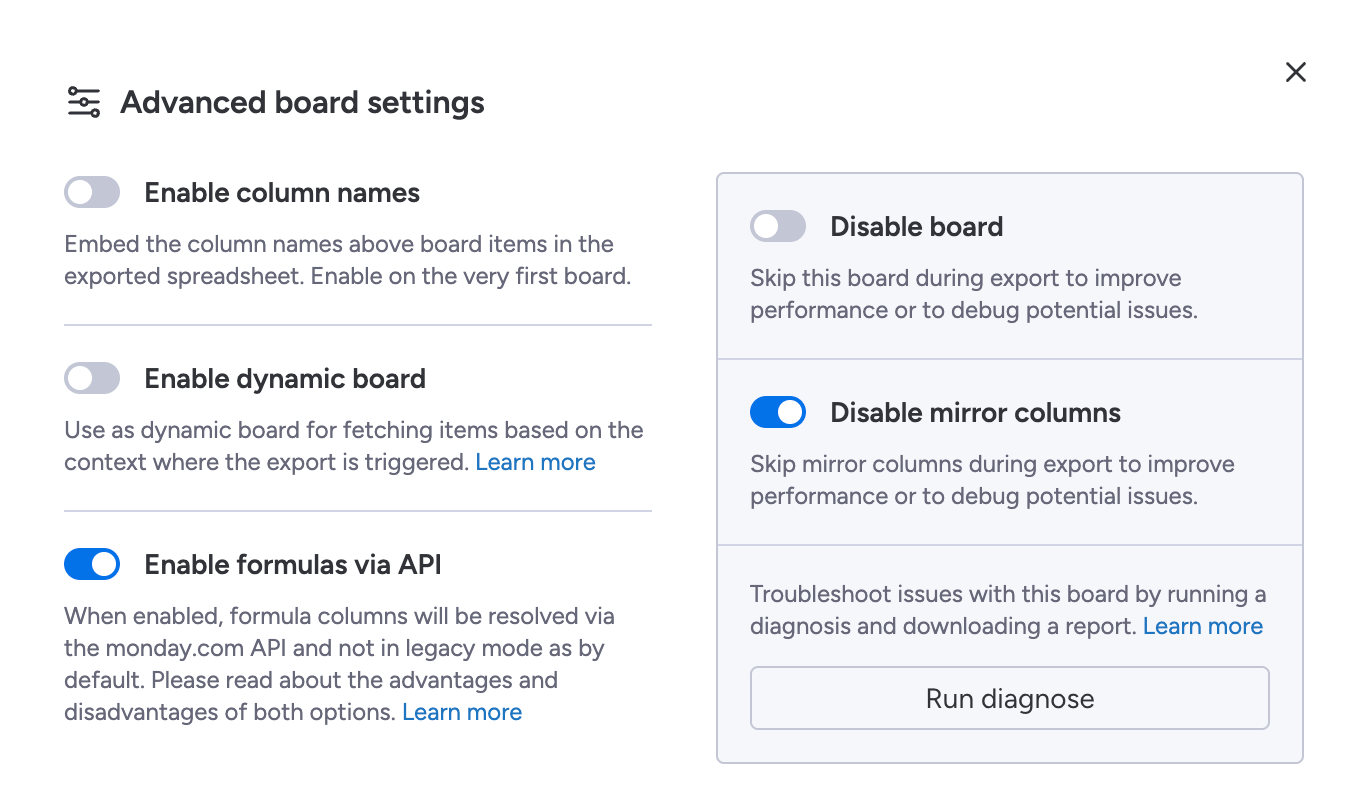
When to use which advanced setting
- Enable column names
Use this to inherit and embed the board column names above the board items in the exported spreadsheet. You likely only want to enable this on the very first board of your configuration. - Enable dynamic board
Use the current board as a dynamic board for fetching items based on the context where the export is triggered. Learn more about how and when to use the dynamic board feature here. - Enable formulas via API
Use this to resolve native monday.com formula columns via the monday API, instead of resolving them client sided as by default. Learn more about this is experimental feature here. - Disable board
Enable this option to completely skip this specific board during export to improve performance or to debug potential issues. - Disable mirror columns
Use this to skip all mirror columns on this specific board during export to improve performance or to debug potential issues. - Run diagnose
Troubleshoot issues on the board by running a diagnosis and downloading a report. Learn more about how to troubleshoot here.