



Leverage templates to manage, merge, calculate and export board items to Excel spreadsheets and email them periodically with automations.





Board filters
How to use board filters to narrow down monday.com board items in exported spreadsheets
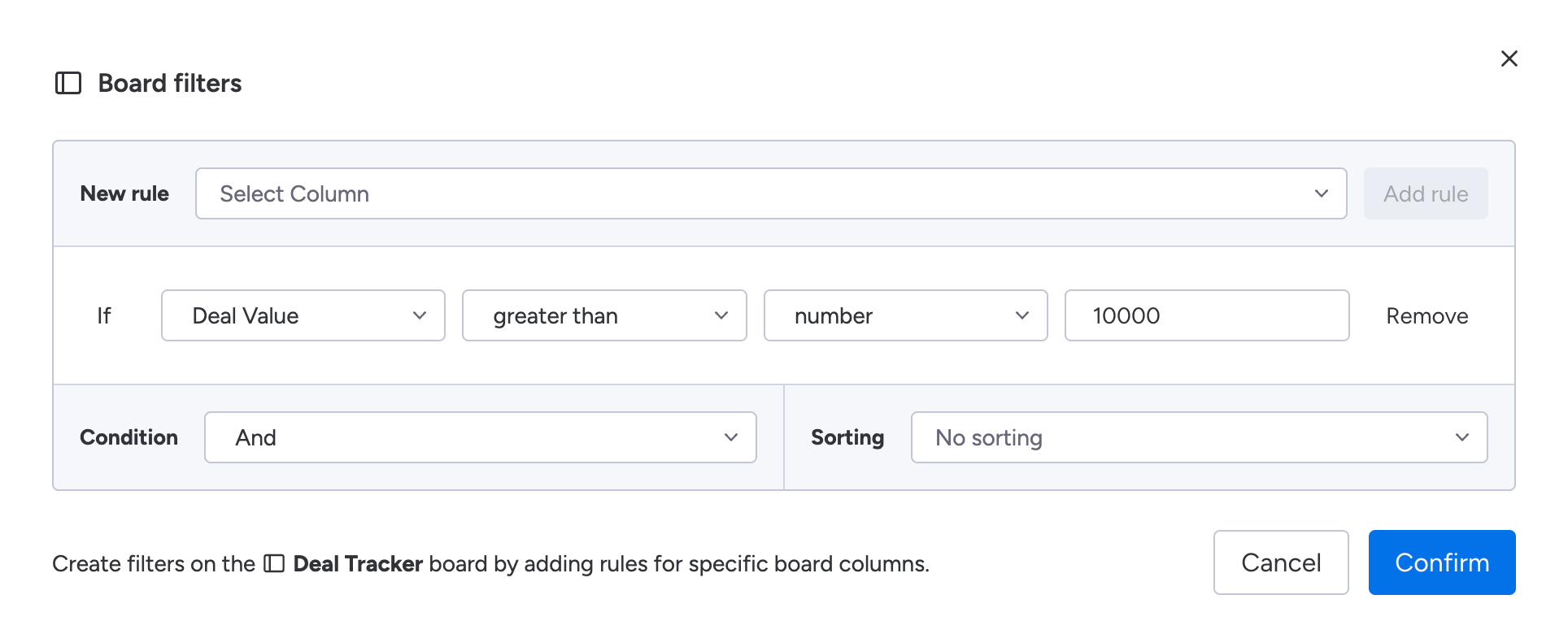
Board filters in Spreadsheet Gorilla for monday.com let you include or exclude specific board items per board in a template that's meant for export to Excel. A board filter is build up upon one or more rules. Each rule is based on a specific board column, followed by operators and values. In addition you can choose from an AND or OR condition that is applied to your rules, and optionally you can define an Ascending or Descending column based sorting.
How to create rule based filters
- Click the
Add filtersbutton on the designated board - Then select the column from which items should be filtered
- Choose operators and set values as shown on screen
- Click
Add ruleand repeat the steps 2 to 3 if needed - Now set a condition logic and a column sorting
- Click the
Confirmbutton to save your filters
How it works
How board filters work in Spreadsheet Gorilla
Board filters are applied per board inside a template and directly affect which items are included in the exported spreadsheet.
This means:
- Only items matching your filter rules will appear in the export
- Filters do not modify your original monday.com board
Using board filters is especially useful when:
- You want to export only specific statuses, dates, or owners
- You need different filtered views across multiple worksheets
Examples
Use cases for board filters in Spreadsheet Gorilla
- Export only items with status
Done - Include items assigned to a specific person
- Filter by date ranges for reporting
- Sort items by priority or timeline before export