



Leverage templates to manage, merge, calculate and export board items to Excel spreadsheets and email them periodically with automations.





Use board filters to only display specific board items in sections
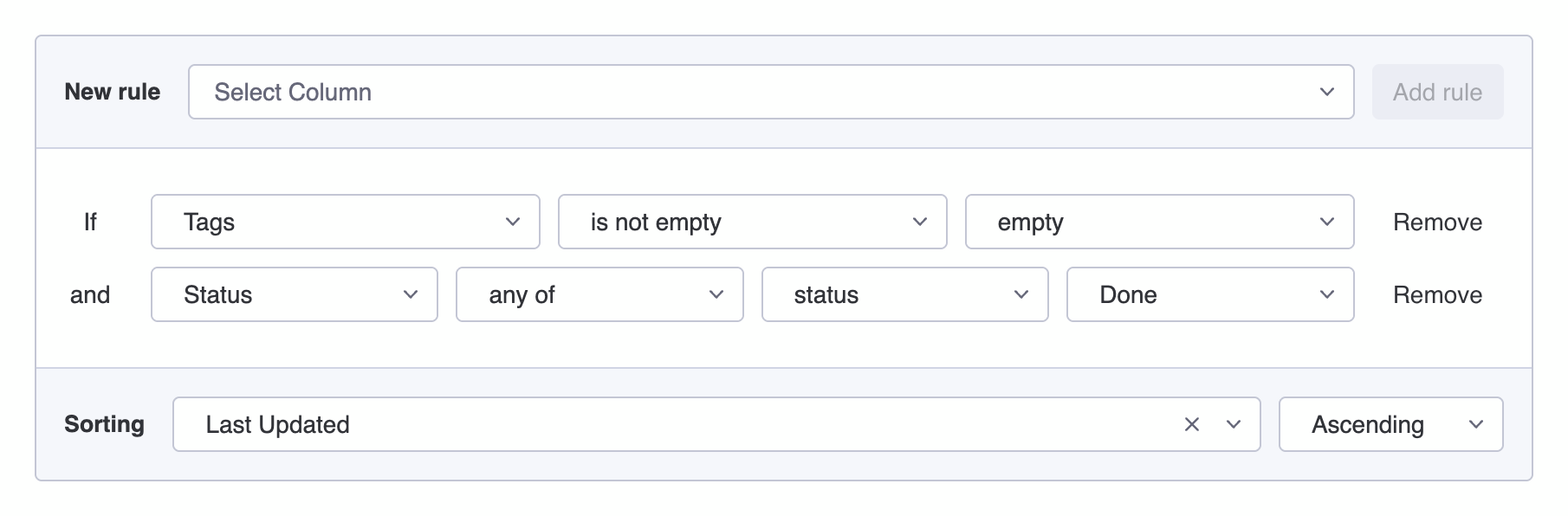
Board filters allow you to display only specific items from a board in the monday.com client portal. Filters work by defining rules that determine which items should be included in the result. Each rule compares a column value with a condition, such as matching text, checking a date range, or verifying whether a column is empty. Filters can also be combined and sorted to control how items appear in the portal.
Introduction
What are Board Filters?
Board Filters allow you to show only the items from a monday.com board that match certain conditions. For example, you may want to show:
- only items assigned to a specific person on monday.com
- only items marked Done, Stuck, or Working on it
- only items due this week
Did you know?
Filters help your client focus on the information that matters instead of showing every item on the board.
How it works
How board filters work
A filter is made up of rules. Each rule checks something about an item on the board, for example:
StatusequalsDoneOwnerequalsJohnDue DateisToday
Only items that match the rule will be displayed.
Combining rules
Combining multiple rules in one filter
You can combine several rules to make filters more precise. For example, show only items where:
StatusequalsDoneDue DateisThis Month
This filter will only show items that are completed and due during the current month.
Supported columns
What you can filter by
You can filter by many types of information from your board, including:
- Item name
- Status
- People
- Dates
- Numbers
- Tags
- Groups
- and more
Item sorting
Sorting filtered board items
After applying filter rules, you can also sort the results. For example:
- sort by Due Date
- sort by Last Updated
- sort by Creation Date
Did you know?
Sorting helps organize the filtered items in a meaningful order. Sorting can even be applied without using rules.
Troubleshooting
Troubleshooting board filters
If a filter does not show the items you expect, check the following:
- The column value does not match the filter
- Multiple rules may hide items
- The board does not contain matching items
Tips & Tricks
Best practices
- Start with one simple rule
- Add more rules only when needed
- Test filters to make sure they return the expected items
- Keep filters simple whenever possible