Build custom, structured Excel reports from monday.com board data and send them automatically to the right people on schedule.





Website presentation
Make shared monday.com data website friendly
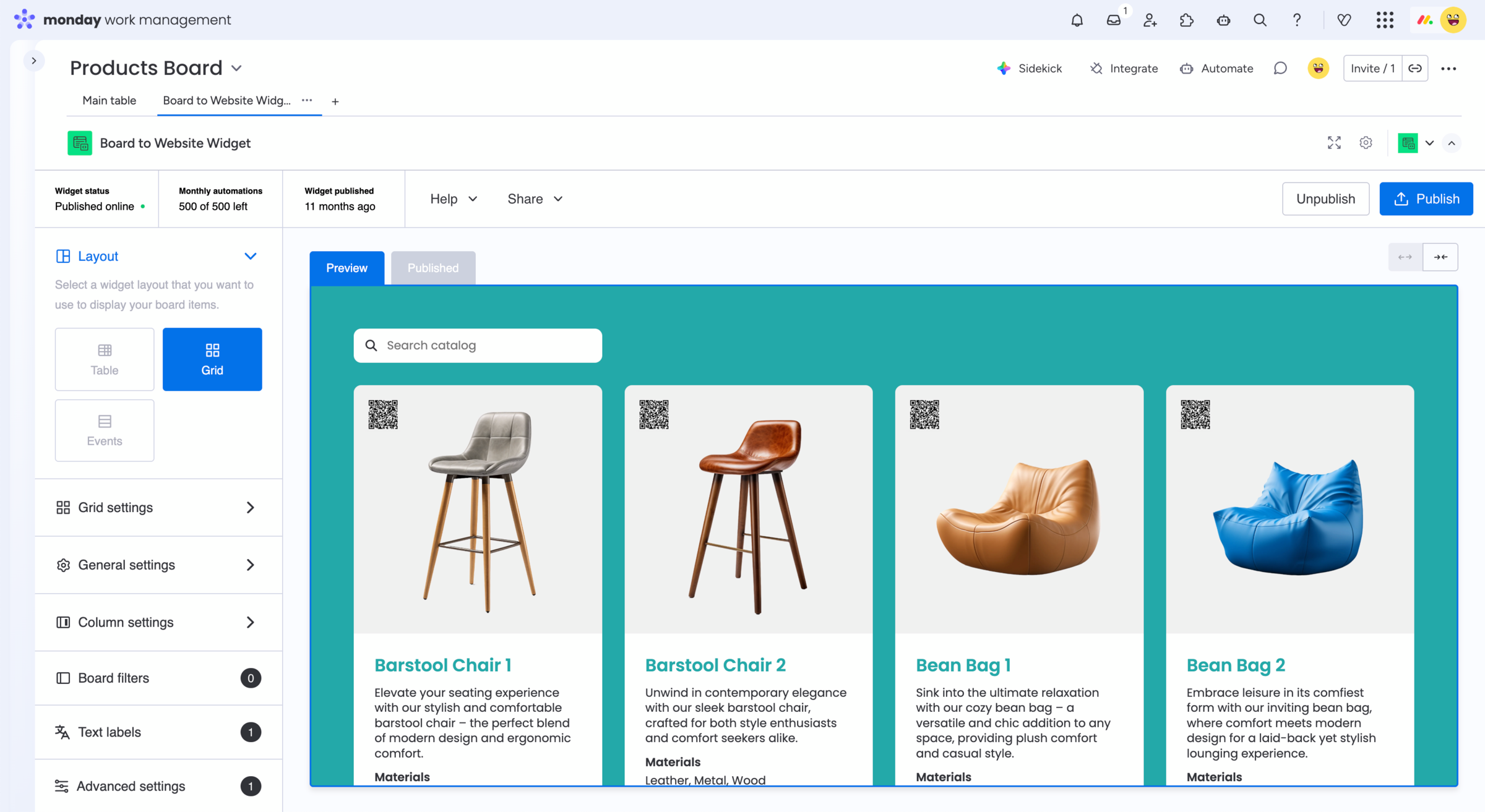
Turn structured monday.com board information into an external view that fits more naturally into your website instead of looking like an internal workspace. Use Board to Website Widget to choose a layout, customize the appearance and publish selected board data as a website widget you can share or embed.

Want to share monday.com boards in branded portal?
Explore the Client Portal Builder for monday.com app.
Ways to visually customize data from monday.com boards
Layout options
Choose how board items are displayed
Select a Table, Grid or Events layout depending on the information you publish and how you want website visitors to browse it.
Visual design
Match the widget to your website
Customize colors, fonts and other global settings so the published board information fits more naturally into your existing website design.
External experience
Present board data for website visitors
Turn internal monday.com board information into a dedicated external view instead of exposing the standard board interface to your website audience.
See how website friendly board sharing can work
Your monday.com board remains the place where your team manages the information. Board to Website Widget turns selected items and columns into a separate web based widget with its own layout and appearance. Choose between Table, Grid and Events layouts, adjust design settings and publish the result as a direct link or embed it into your website.
1. Select your monday.com board
Add Board to Website Widget to the board containing the information you want to present on your website.
2. Configure the presentation
Choose a Table, Grid or Events layout and adjust the displayed columns, colors, fonts and available layout settings.
3. Publish and embed the result
Publish your widget and copy the embed code to add it to your website, or share the same result directly through its public URL.
When a monday.com shared view is enough
monday.com already lets board owners make supported board views publicly accessible through a shareable link or embedded full screen view. A native shared view can be the easiest option when:
- The standard monday.com presentation works for your audience
- Your visitors are comfortable browsing a board style interface
- You only need a straightforward public view
- You do not need a separate website specific layout or design
For simple public board sharing, there may be no need for an app.
When the board should feel like website content
Board to Website Widget is designed for cases where monday.com remains the place your team manages information, but the external result should fit more naturally into your website.
You can choose from Table, Grid and Events layouts, customize colors and fonts, control which board information appears and adjust labels for the external audience.
This is useful when the published board information should feel like part of your website rather than an exposed internal board view.
Frequently asked questions
-
Yes. Board to Website Widget lets you choose a layout and customize settings such as colors and fonts so the published board information can better fit your website.
-
Which layouts are available in Board to Website Widget?
Board to Website Widget currently provides Table, Grid and Events layouts. Each layout has its own settings for controlling how published board information is displayed.
-
Can I match the widget to my website branding?
Yes. General settings let you adjust colors and fonts in the widget, while additional layout and column settings give you further control over the published presentation.
-
Can I change the labels shown to website visitors?
Yes. Board to Website Widget provides text label settings that let you change or translate labels shown in the published widget.
-
Do I need to recreate my monday.com data on my website?
No. Your team can continue managing the information in monday.com. Board to Website Widget publishes selected board data as a separate web based widget that can be embedded into your website.
Example for a product catalog
Explore a live Board to Website Widget
This example is published directly from a monday.com board.
Browse the widget and see how structured board data can be
presented as website content rather than a standard board view.
Looking for other use cases? Explore feature requests, customer
reviews, events and calendars, real estate listings, and more.
Solve common monday.com
shared view limitations
Presenting board information externally can lead to additional
needs. Board to Website Widget can also help when you need to:

Get started
Publish monday.com board data with Board to Website Widget
Turn selected monday.com board information into a website friendly view with layouts and design settings that better fit your external audience. Share the result directly or embed it into your website.