Build custom, structured Excel reports from monday.com board data and send them automatically to the right people on schedule.





Connected board data
Share connected monday.com board data publicly
Keep important information from Connect Boards and Mirror Columns visible when you publish monday.com board data for clients, customers, partners or website visitors. Board to Website Widget can include supported connected and mirrored information in the external view instead of limiting your published content to values stored directly on the source board.

Want to share connected monday.com boards privately?
Explore the Client Portal Builder for monday.com app.
Ways to share connected data from monday.com boards
Connected items
Publish linked item information
Include supported Connect Boards values so external users can see related item information alongside the monday.com board data you publish.
Mirror values
Share mirrored values externally
Publish supported Mirror Column values from connected boards so important related information remains available in the external website view.
Board relationships
Keep connected context together
Present connected and mirrored information together with your main board items instead of recreating related values manually for external sharing.
See how connected board sharing can work
Connect Boards Columns link items from different monday.com boards, while Mirror Columns can surface values from those connected items on another board. Board to Website Widget publishes supported values from the board where the widget is configured, including connected and mirrored information that should form part of the external view. Mirror Column values are displayed as raw text rather than inheriting their original monday.com column formatting.
1. Select your monday.com board
Add Board to Website Widget to the board containing the connected or mirrored information you want to make available externally.
2. Choose the connected data
Select the supported Connect Boards and Mirror Columns you want to include together with the other board information in your widget.
3. Publish the external view
Publish your widget and share its public URL or embed the resulting connected board information directly into your website.
When a monday.com shared view is enough
monday.com already lets board owners make supported board views publicly accessible through a shareable link or iframe embed. However, monday.com currently states that mirrored items do not appear in publicly shared board views due to privacy. A native shared view can still be the easiest option when:
- Connected or mirrored information is not required externally
- The source board already contains everything visitors need
- The standard monday.com presentation works for your audience
- You do not need additional website specific functionality
For simple board information without connected data, there may be no need for an app.
When connected data needs to be visible
Board to Website Widget is useful when information linked through Connect Boards or surfaced through Mirror Columns forms an important part of what your external audience needs to see.
Supported connected information can be included alongside the rest of your published board data. Mirror Columns are currently displayed as raw text because their original column type cannot be inherited through the monday.com API.
This is useful when removing connected values would leave your external board view incomplete or without important context.
Frequently asked questions
-
Yes. Board to Website Widget can include supported Mirror Column values in the published website widget so mirrored information can be displayed to external users.
-
Do Mirror Columns appear in monday.com public shared views?
monday.com currently states that mirrored items do not appear in publicly shared board views due to privacy. Board to Website Widget provides a separate published website view where supported Mirror Column values can be included.
-
Can I publish Connect Boards information externally?
Yes. Supported information from Connect Boards Columns can be included alongside the other monday.com board columns you choose to publish in Board to Website Widget.
-
Do Mirror Columns keep their original formatting?
No. Mirror Columns are currently displayed as raw text in Board to Website Widget because the monday.com API does not provide their original column type to the widget.
-
Do external users need access to the connected monday.com boards?
No. Board to Website Widget publishes the configured board data as a separate web based widget that can be shared directly or embedded into a website without giving visitors access to your monday.com workspace.
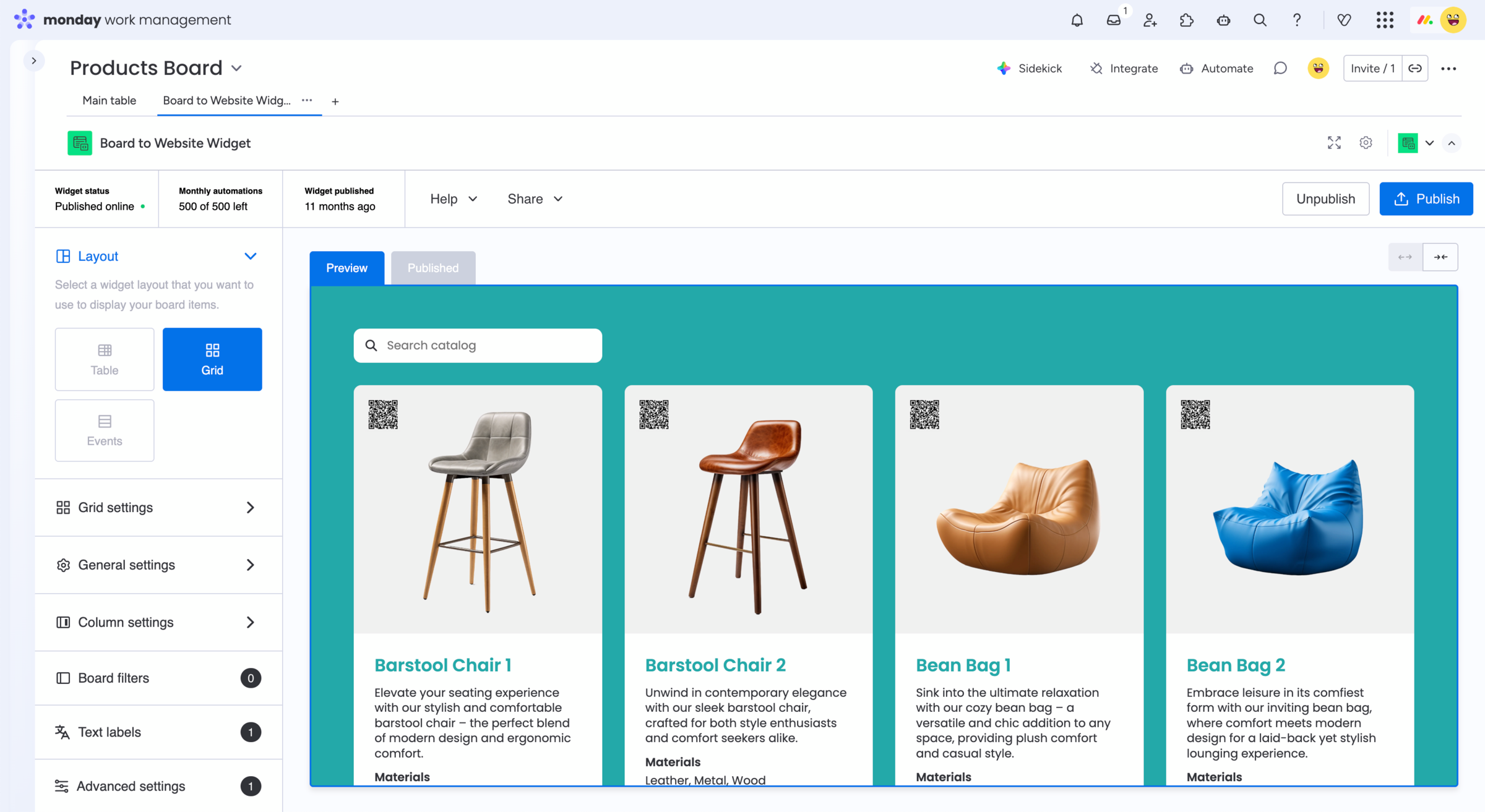
Example for a product catalog
Explore a live Board to Website Widget
This example is published directly from a monday.com board.
Browse the widget and see how structured board information
can become part of an external website view.
Looking for other use cases? Explore feature requests, customer
reviews, events and calendars, real estate listings, and more.
Solve common monday.com
shared view limitations
Sharing connected board information externally can lead to additional
requirements. Board to Website Widget can also help when you need to:

Get started
Publish monday.com board data with Board to Website Widget
Turn monday.com board information, including supported connected data, into a website-friendly shared view. Send external users a direct link or embed the same content directly into your website.