Build custom, structured Excel reports from monday.com board data and send them automatically to the right people on schedule.




Visibility controls
Control what external users can see
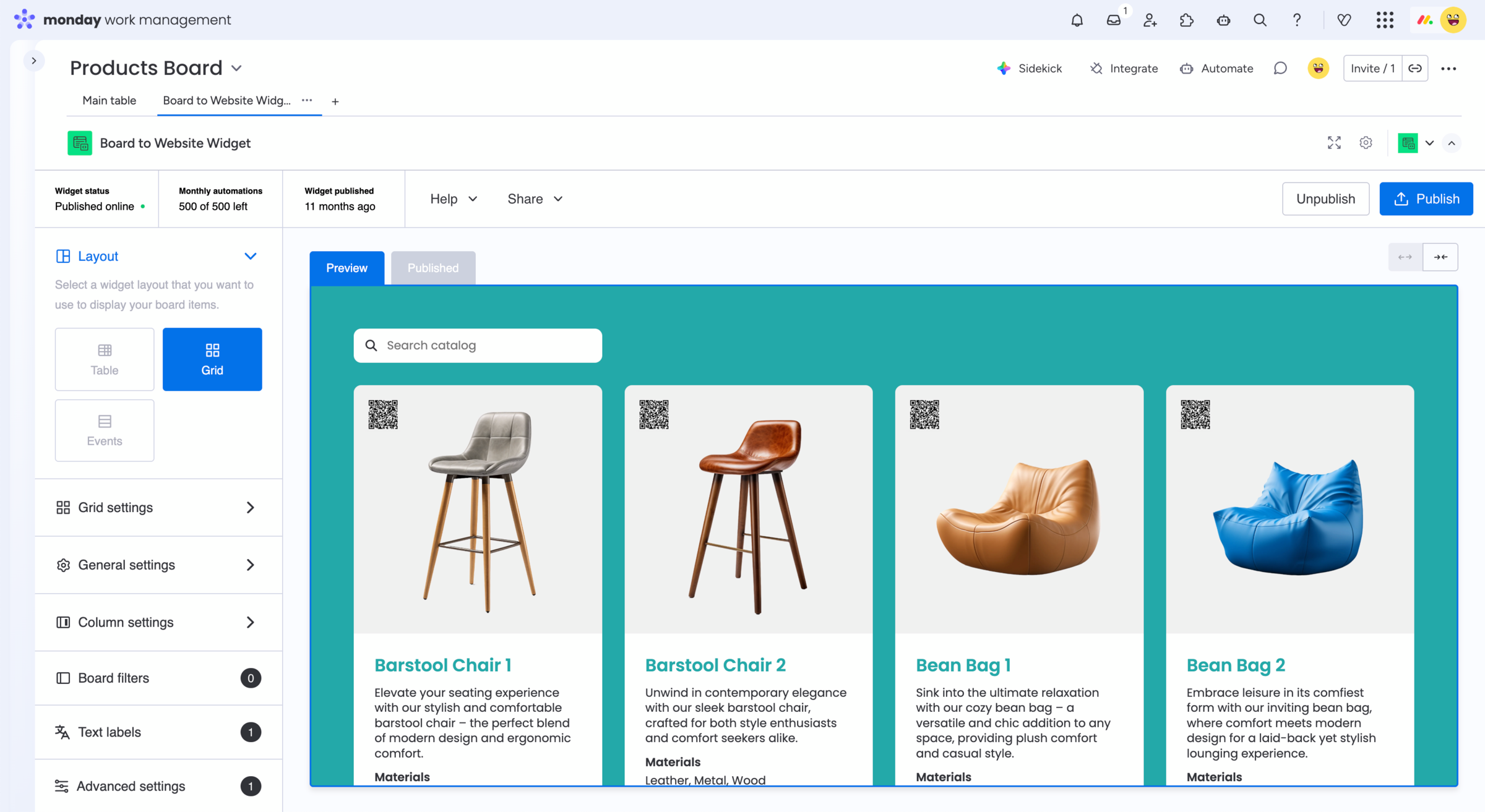
Share the monday.com information your external audience actually needs without presenting every item and column from your internal board. Use Board to Website Widget to choose displayed columns, apply publication filters and create a focused external view that can be shared directly or embedded into your website.

Want to control visibility per client from monday.com boards?
Explore the Client Portal Builder for monday.com app.
Ways to control visibility from monday.com boards
Column visibility
Choose which board columns to display
Select the monday.com columns that should appear in your published widget and leave unrelated board information out of the external view.
Item filters
Publish only matching board items
Apply column based rules to include or exclude items from your published widget based on values such as status, group or other board information.
Different views
Create focused views from one board
Use filters and URL parameters to display different subsets of the same published board across separate website pages or external views.
See how controlled monday.com board sharing can work
Your monday.com board can continue containing all of the information your team needs internally. Board to Website Widget lets you configure which columns appear and which items match the rules for the external website view. The widget settings work independently from your native monday.com board filters, so you can keep your internal board setup while configuring the published result separately.
1. Select your monday.com board
Add Board to Website Widget to the board containing the information you want to publish for your external audience.
2. Choose what to display
Select the board columns to show and apply filter rules that determine which items appear in the resulting website widget.
3. Publish the external view
Publish your configured widget and share its public URL or embed the focused board view directly into your website.
When a monday.com shared view is enough
monday.com already lets you control the appearance of public shared views by applying board filters and hiding columns before saving and sharing the view. A native shared view can be the easiest option when:
- You only need a simple filtered board view
- Hiding columns provides enough presentation control
- The standard monday.com presentation works for your audience
- The information you are sharing is suitable for a public view
For straightforward public sharing, there may be no need for an app.
When you need control over shared boards
Board to Website Widget provides its own column settings and board filters specifically for the published website widget. These settings work independently from your native monday.com board filters.
You can choose the displayed columns, create multiple filter rules and use URL parameters to show different subsets of the same board in different places. The resulting widget can then be shared directly or embedded into your website.
This is useful when the external result needs to be more focused than the board your team works with internally.
Frequently asked questions
-
Yes. Board to Website Widget provides column settings that let you choose which board columns are displayed in the published website widget.
-
Can I filter which board items are published?
Yes. Board filters let you create column based rules that include or exclude matching items from the published widget. Multiple filter rules can be applied at the same time.
-
Do I need to change my existing monday.com board filters?
No. Board to Website Widget has its own board filters that work independently from the native filters on your monday.com board.
-
Can I create different external views from the same board?
Yes. URL parameters can be used to apply different group or column filters to the same published widget, allowing you to display different subsets of the board in different places.
-
Are visibility filters a replacement for private access controls?
No. A publicly shared or embedded view should not be used for information that requires permission based access. Visibility settings are useful for controlling the external presentation, while confidential or client specific information should be shared through an appropriate private access solution like Client Portal Builder for monday.com.
Example for a product catalog
Explore a live Board to Website Widget
This example is published directly from a monday.com board.
Browse the widget and see how selected board information
can be presented as a focused external website view.
Looking for other use cases? Explore feature requests, customer
reviews, events and calendars, real estate listings, and more.
Solve common monday.com
shared view limitations
Sharing selected board information externally can lead to additional
needs. Board to Website Widget can also help when you need to:

Get started
Publish monday.com board data with Board to Website Widget
Turn selected monday.com board information into a focused, website-friendly shared view. Choose what external users see and share the result directly or embed it into your website.