Build custom, structured Excel reports from monday.com board data and send them automatically to the right people on schedule.





External board sharing
Share or embed a monday.com board
Share monday.com board information with clients, customers, partners or website visitors without giving them access to your monday.com workspace. Use a native monday.com shared view for simple public sharing, or publish selected board data with Board to Website Widget when you need more control over what external users see and how it is presented.

Looking for a way to privately share monday.com boards?
Explore the Client Portal Builder for monday.com app.
Ways to share monday.com board data externally
Share externally
Share board data without workspace access
Make monday.com information available to people outside your account without adding them as monday.com users. Share your board view with a public URL.
Embed on websites
Add monday.com data to your website
Embed your published board content into an existing website, customer resource page or other web page instead of sending visitors to monday.com.
Control the result
Choose what external users can see
Select the items and columns you want to publish, apply filters and present your board data in a layout designed for an external audience.
See how monday.com board sharing can work
Your monday.com board remains the place where your team manages the information. Board to Website Widget turns selected board data into a separate web based view that can either be opened directly through a URL or embedded into your website. Changes to your monday.com board can be republished manually or with monday.com automations, so you do not need to recreate the same information separately on your website.
1. Select your monday.com board
Add Board to Website Widget to the board containing the information you want to share or embed externally.
2. Configure the shared view
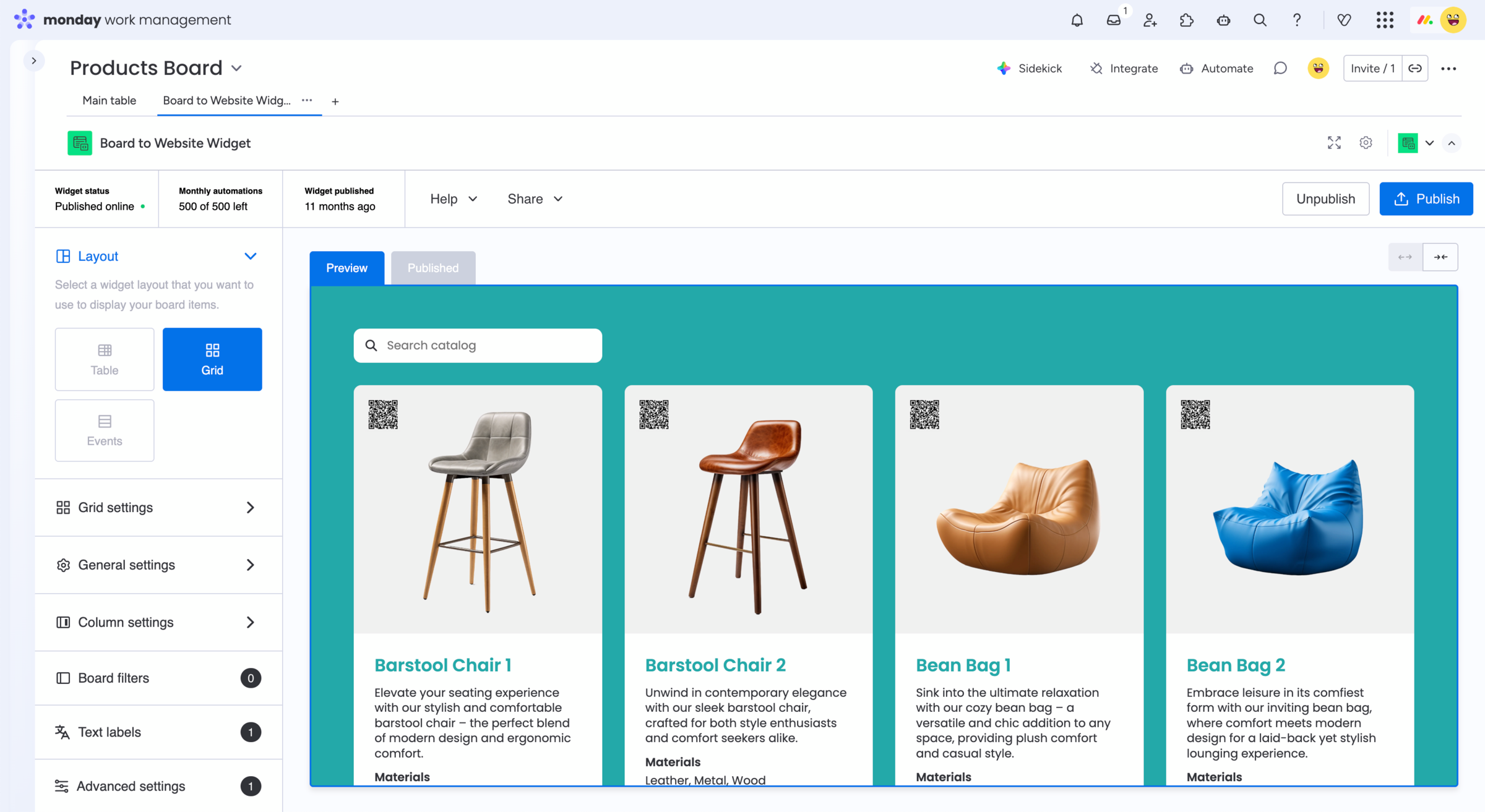
Choose the items and columns to publish, apply filters and configure the layout and appearance of your widget.
3. Share or embed the result
Publish the widget and copy its direct share link or embed code. Republish it manually or use automations on a schedule.
When a monday.com shared view is enough
monday.com already lets board owners publicly share supported board views. You can copy a shareable link or use the provided iframe embed code to display the shared view on a website. Filters and hidden columns can also be saved as part of the view before sharing it. A native shared view can be the easiest option when:
- You simply need to make a board or view publicly available
- The standard monday.com presentation works for your audience
- The information you need is supported in shared views
- You do not need additional website specific functionality
For straightforward public sharing, there may be no need for an app.
When you need control over shared boards
Board to Website Widget for monday.com is designed for cases where the board remains your internal source of truth, but the external result should work more like website content.
You can choose which board information is published, apply filters, use different table or grid layouts, customize the appearance and add features such as search and access to supported files and images. The same published widget can then be shared directly or embedded into your website.
This is useful when a standard shared board view does not provide the presentation or functionality your external audience needs.
Frequently asked questions
-
Yes. monday.com provides public shared views that can be opened through a shareable link. Board to Website Widget can also publish selected board data as a separate web based view that can be shared directly with external users.
-
Can I embed a monday.com board on my website?
Yes. monday.com shared views provide an iframe embed code for public views. With Board to Website Widget, you can instead publish selected board data as a customizable widget and embed that result into your website.
-
Do external users need a monday.com account?
No. Public monday.com shared views can be opened through a browser without giving the viewer access to your monday.com account. Board to Website Widget is likewise designed to make published board information accessible to external audiences.
-
Can I choose which items and columns are visible?
Yes. Board to Website Widget lets you select the board items and columns you want to publish and apply filters to control the resulting view. monday.com’s native shared views can also use saved filters and hidden columns.
-
How is Board to Website Widget different from a monday.com shared view?
A native shared view is useful when you simply want to make a monday.com view publicly accessible. Board to Website Widget is intended for cases where you want more control over the external presentation, including different layouts, search, selected board content, supported files and images, and website specific customization.
Example for a product catalog
Explore a live Board to Website Widget
This example is published directly from a monday.com board.
Search, browse and interact with the widget just like
an external website visitor would.
Looking for other use cases? Explore feature requests, customer
reviews, events and calendars, real estate listings, and more.
Solve common monday.com
shared view limitations
Sharing a board externally often leads to more specific requirements.
Board to Website Widget can also help when you need to:

Get started
Publish monday.com board data with Board to Website Widget
Turn selected monday.com board information into a website-friendly shared view. Send external users a direct link or embed the same content directly into your website.